Change Management Documentation That Works
A software update goes live on Friday afternoon. By Monday, the support team is fielding questions they were never trained to answer, finance is working from an outdated process, and no one can confirm who approved the final configuration. The problem is rarely the change itself. It is the absence of change management documentation that gives people a shared, usable record of what changed, why it changed, and what happens next.
For small and mid-sized organizations, change documentation does not need to become a heavy bureaucracy. It needs to make work more predictable. The right documentation helps teams protect operations, train affected employees, meet compliance expectations, and avoid the expensive confusion that follows an undocumented decision.
What Change Management Documentation Should Accomplish
Change management documentation is the collection of records used to plan, assess, approve, communicate, implement, and review a business or technical change. The change might be a new software feature, revised onboarding workflow, updated policy, vendor transition, system migration, or a new approval process.
A useful documentation set answers practical questions quickly: What is changing? Why is it necessary? Who owns the work? Who will be affected? What risks need attention? How will the team know the change worked? If it fails, what is the fallback plan?
That clarity matters because verbal updates and scattered chat messages do not create a reliable operating record. They are difficult to find, easy to misinterpret, and nearly impossible to use when a new employee joins the team six months later. Well-structured documents turn a change from a series of conversations into an accountable business process.
The Core Documents for Managing Change
The exact documentation package depends on the size and risk level of the change. A minor wording update to an internal form should not require the same review process as a customer-facing software release or payroll system conversion. Still, most organizations benefit from a consistent foundation.
Change Request and Business Rationale
The change request is the starting point. It captures the proposed change, the person or team requesting it, the business reason, and the desired outcome. It should state the problem in plain language rather than bury it in technical terminology.
For example, “Update the customer onboarding workflow” is too broad. A stronger request explains that the current workflow requires manual data entry in three systems, delays account activation by two days, and creates inconsistent customer records. That framing gives decision-makers the context needed to prioritize the work.
Impact and Risk Assessment
Before approval, document who and what the change will affect. Consider systems, departments, customers, vendors, data, reporting, security, training requirements, and compliance obligations. This is where teams identify dependencies that may not be obvious to the person requesting the change.
Risk assessment should be realistic, not alarmist. A change can carry low technical risk but high operational risk if it affects many employees. Conversely, a change may be technically complex but have limited business impact if it is isolated to a small internal tool. Recording those distinctions helps leaders choose the right level of review and testing.
Approval Record
Approvals should be visible and specific. The document should identify who reviewed the change, what they approved, the approval date, and any conditions attached to the decision. A vague statement such as “leadership approved” is not enough when questions arise later.
For higher-risk changes, approval may need input from operations, IT, security, legal, finance, or the affected business owner. For routine changes, a department manager may be sufficient. The point is not to involve every stakeholder in every decision. It is to ensure the people accountable for the consequences have an opportunity to review the plan.
Implementation Plan and Rollback Plan
The implementation plan translates approval into action. It should identify the tasks, owners, sequence, deadlines, required resources, and planned release or effective date. If a task cannot be assigned to a person or role, it is not yet planned.
A rollback plan is equally valuable for material changes. It explains how the organization will restore the prior process, configuration, or version if the rollout creates an unacceptable issue. Not every change can be reversed completely, particularly when data is converted or contracts are changed. In those cases, document the recovery steps, escalation path, and decision authority before implementation begins.
Testing, Training, and Communication Materials
Testing documentation provides evidence that the change was checked against defined requirements. It can include test cases, results, issue logs, user acceptance signoff, and final readiness decisions. For software-related changes, screenshots and step-by-step instructions are especially useful because they show users exactly what to expect.
Training and communication materials answer a different question: Can affected people perform their work correctly after the change? Depending on the audience, this may include an updated SOP, interactive user guide, quick-reference sheet, manager briefing, release notes, or presentation. A technically successful rollout can still fail operationally when users receive unclear instructions or learn about the change after it takes effect.
Post-Implementation Review
After deployment, document what happened. Did the change meet the intended objective? Were there incidents, unexpected workarounds, support requests, or customer concerns? Are additional updates needed?
This review should not be a blame exercise. Its purpose is to improve future decisions and keep the documentation current. If a new workflow required five clarification emails during its first week, that is a signal that the procedure or user guide needs improvement.
How to Build a Documentation Process People Will Use
A strong process has enough structure to create consistency without forcing teams through unnecessary paperwork. Start by classifying changes according to their potential impact. Many organizations use categories such as standard, normal, and emergency changes.
Standard changes are repeatable, low-risk activities with preapproved procedures, such as creating a user account or applying a routine software patch. Normal changes require review and planned implementation. Emergency changes address an urgent business, security, or service issue and may need accelerated approval. Even emergency work should be documented afterward, including why the normal process could not be followed.
Next, create templates that match those categories. A one-page standard change form may be enough for routine work, while a larger project may need a detailed impact assessment, implementation plan, test record, and training package. Requiring a 10-page document for a small adjustment encourages people to bypass the process. Requiring only an email for a system migration leaves too much to chance.
Ownership is another common failure point. Assign a change owner who is responsible for maintaining the record, coordinating approvals, and confirming the post-implementation review occurs. That person does not need to perform every task, but someone must be accountable for the complete documentation trail.
Store records in a controlled, accessible location. Teams need to know where the current version lives, who can edit it, and how prior versions are retained. A shared drive, document management platform, project workspace, or service management system can work well if the structure is consistent. The tool matters less than clear naming conventions, version control, and permissions.
Writing Documentation That Supports Action
Change records often fail because they are written for the person who already understands the project. Write for the employee, manager, auditor, or support specialist who may encounter the document later with no background knowledge.
Use direct language, meaningful headings, and specific dates. Replace “the system will be updated soon” with “The customer portal will be updated on March 15, 2027, between 8:00 and 10:00 p.m. Eastern Time.” Replace “users will be notified” with “The operations manager will send the approved email announcement to account coordinators by March 12.”
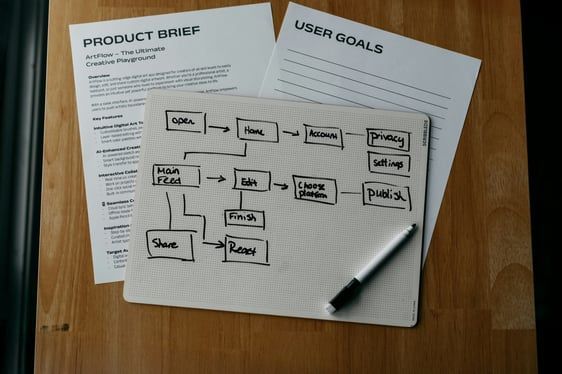
Visual elements can reduce ambiguity when they serve a purpose. Screenshots, workflow diagrams, tables, and annotated forms are useful for complex procedures. They should be current, readable, and tied to a written instruction. A screenshot without context can become confusing as soon as the software interface changes.
Review cycles also matter. A document that accurately described last year’s process can create risk if people continue treating it as current. Set review dates for policies, SOPs, user guides, and recurring change templates. When a related process changes, identify the documents that must be revised as part of the implementation plan.
When Outside Documentation Support Makes Sense
Internal teams often know their processes well but lack the time or technical writing discipline to convert that knowledge into polished, usable materials. This is especially common during software launches, rapid growth, compliance preparation, and process redesign.
Outside support can be valuable when documentation must be created quickly, standardized across departments, or presented professionally to customers, staff, or leadership. Neithdos Consulting Services helps organizations turn operational knowledge into structured SOPs, user guides, policy documents, checklists, and presentation materials that support real adoption.
The goal is not to produce more documents. It is to produce the right records, written clearly enough that people can act on them with confidence. When the next change arrives, a documented process gives your team a place to start instead of forcing them to rebuild clarity from scratch.